
An enterprise AI adoption strategy sets out which work AI should improve, who owns that improvement, and what evidence will justify further investment. For a company with 100 or more employees, it also has to answer a harder question: how will useful practice spread beyond the handful of people who already know what they're doing?
Start by agreeing what AI adoption means for your company. Buying access, training people, sorting out permissions, and supporting teams after launch all belong in that plan. This guide focuses on employees using generative AI in their work, with a practical test at its center: does the finished work improve?
When the program spans departments or sectors, adapt each practice to the role and industry conditions before assuming one team's result will transfer.
Find the constraint before expanding the program
Rising usage can hide a workflow that has barely improved. Someone might open a tool every day but spend more time checking its output than they save. Another employee might use it twice a month for a demanding report and get considerable value.
For program decisions, separate three questions:
- Access. Can people participate?
- Use. Do they use AI on the work it is meant to help with?
- Improvement. Is the finished result better, faster, or less costly at an acceptable standard?
A rising login count answers only part of that story. To make the forward commitment clear, set adoption goals around the task, its work cycle and accepted quality, including what happens when AI is unsuitable.
An August 2025 discussion in Reddit's r/sysadmin captures how easily a rollout can get stuck on access. One employee described a large company that had announced Copilot and blocked ChatGPT. The next idea was to change employees' desktops.
My boss is asking about possibly putting a CoPilot shortcut on the task bar, but I hesitate to want to make any changes to the user's desktop experience.
The employee described a fairly large company; its identity and headcount were not stated. This is a self-reported rollout question.
Another Reddit user urged them to investigate why staff wanted other tools in the first place. That is a useful question for your own rollout. Making a tool easier to open helps with access; understanding why someone reaches for an alternative tells you more about task fit.
Ask a team to walk you through a recent task, including the awkward parts:
- Where did they switch tools?
- Which output did they throw away?
- Who checked it?
- What happened after they finished their part?
Start with the symptom you can observe. These are investigation paths, not a diagnosis of every possible cause.
| What you observe | What to investigate next |
|---|---|
People cannot start | Check access and permissions, including the information the task needs. |
People try once, then leave | Inspect task fit and the support available when the first attempt fails. |
Use rises without an improvement | Measure checking, rework and effort passed to other people. |
One team improves while others stall | Test what needs to change in the workflow, ownership and support for another team. |
If a team can't access the documents it needs, another prompting workshop won't resolve that dependency. If the output is useful but nobody has permission to change the approval process, the next conversation belongs with the process owner.
This is why a company-wide maturity score is rarely enough to choose your next action. Finance might have a well-supported monthly workflow while sales is still deciding what customer information it can use. Work through the constraint in each setting.
When people disagree about whether a workflow is ready, inspect the evidence behind each readiness claim and record what the findings permit. If an older system is involved, separate the AI use’s necessary repairs from the wider modernization investment. Give each commitment its own owner and acceptance evidence.
Choose a workflow with a result you can check
If you need a concrete candidate first, use the task-observation worksheet for finding AI use cases. It helps turn a recent piece of work into a specific idea, with its quality checks and unknowns attached.
Look for a candidate with four practical features:
- A recurring problem. The work has a recognizable cost or delay.
- A checkable result. A subject expert can distinguish an acceptable output from an unacceptable one.
- Approved inputs. The information people need is accessible through approved tools.
- A recovery path. The team knows what to do when the output is wrong.
A useful first candidate might be a hotel reception team's handover to the evening shift: which arriving guests still need a room, which maintenance requests remain open and what staff have promised. The shift supervisor can compare the draft with booking and maintenance records and approve it before the evening team relies on it. An autonomous system making an irreversible decision demands a different level of assurance and operating support.
Before selecting a pilot, write down:
- The work: the task, the people doing it, and how often it happens.
- The current problem: delay, effort, inconsistency, missed information, or another observable issue.
- The acceptance standard: what must be correct, who checks it, and what happens when it fails.
- The proposed change: the part AI assists, the information it uses, and the human decisions that remain.
- The owner: the person who can change the workflow and act on the result.
Microsoft's AI strategy guidance likewise starts with business problems and use cases before selecting technology. Its implementation options are specific to Microsoft's products; the ordering is useful more broadly. Microsoft AI strategy guidance.
Some work is better improved by removing an unnecessary approval, fixing a form, or using a predictable automation. Keep those options in the comparison. Decide when to decline AI for a specified task by naming the alternative and the evidence that would justify reconsidering it.
When several candidates look promising, compare their evidence and the next commitment each needs. Keep uncertain value separate from a reason to reject an idea, and record what would change the recommendation.
Give the program an owner and each workflow an owner
The person coordinating AI adoption cannot personally redesign every department's work. They can organize the program, help teams learn, and bring unresolved decisions to the right people. A business owner still needs to take responsibility for each workflow's results.
Executive coach Glenn Gow puts the ownership problem plainly in his LinkedIn newsletter.
A directive without an owner goes nowhere. An owner without a number is just a title.
Gow's advice draws on his coaching work and executive interviews. The quotation is his recommendation, not a measured adoption result.
The number should describe a business result someone can influence. Assigning a login target alone would leave the workflow question unresolved. A practical starting arrangement has these responsibilities:
| Responsibility | The decision this person must be able to make |
|---|---|
Executive sponsor | Which business outcomes matter, what receives funding, and which cross-team obstacles need intervention |
Adoption or enablement lead | How teams get support, how learning is shared, and which issues reach the sponsor |
Workflow owner | What changes in the work, what counts as acceptable performance, and whether to expand or stop |
IT, security, data, and other specialists | Which tools, information, permissions, and controls the workflow requires |
Team manager and champions | How people get time to practise, where they get help, and which problems need escalation |
In a 150-person organization, one person may hold several of these responsibilities. In a larger company, business units may need their own workflow owners and local support. The test is whether decisions get made and support is available, rather than whether the organization chart has a particular title. For this size band, test what a 100-to-499-person company can realistically support against protected time, specialist availability and ongoing help. For a specific hiring decision, compare a chief AI officer with an existing executive or program lead using the decisions and capacity the company needs.
For sponsors already in place, demonstrate useful AI leadership through real work and employee feedback before asking teams to copy the practice. Show the source check and agree how the trial fits their workload.
When proposals compete for the same specialist or budget, give the AI steering committee a concrete shared-capacity choice. Separate that resource commitment from any security, data or operational approval still required.
Before the pilot team leaves, transfer each benefit claim with its evidence and continuing review obligation. Keep accepting ownership separate from certifying that a forecast has been achieved.
Connect local ideas to central support
For the ongoing operating model, assign central AI services and local workflow responsibilities. Test who handles missing business information and who supports a failed shared service before expanding delivery.
Give the program a simple operating rhythm:
- Set common boundaries. Agree tool and data-use rules centrally. Let business units choose useful work within them.
- Keep one pilot inventory. Record active pilots, owners, costs, findings, and unresolved dependencies. Look for duplicated work and shared obstacles.
- Review the next decisions with the sponsor. Decide where funding and specialist time should go, including help for teams waiting on the same data connection.
Self Financial offers a concrete example. In an October 2025 interview with Glenn Gow, CEO Julie Szudarek described departmental champions identifying their three biggest AI opportunities. A central AI operations team helped turn those ideas into workflows and train the people using them.
In marketing, that included push notification copy and email subject lines. Gow's account describes an organization of more than 400 employees. The interview's published account.
The useful detail is what happened after a champion raised an idea: someone helped implement it, and the wider team learned how to use it. Build two things into that handoff:
- A route to specialist help. Champions need someone who can help turn an idea into a supported workflow and bring colleagues into the practice.
- An owner for local differences. Instructions, access arrangements, and support that work for English-speaking office staff may need to change for another workforce. Check those assumptions before expanding.
For a multinational rollout, coordinate local AI adoption across countries and languages through explicit readiness decisions. Distinguish a missing local prerequisite from a shared service problem before choosing the next group to start.
Microsoft's Copilot adoption checklist recommends an executive sponsor, a team spanning business, IT and skilling, and champions who help colleagues use the tool. That is implementation guidance, not evidence for a universal staffing ratio. Microsoft's adoption planning checklist.
When the reporting line is still unsettled, compare who should own enterprise AI adoption against the funding and cross-team decisions the role must make.
Hire for the work the role needs to do
When hiring an adoption lead, ask for examples of how they have:
- Investigated a workflow and found what was holding it back.
- Worked with skeptical colleagues and understood their concerns.
- Designed learning that people could apply to their own tasks.
- Interpreted results and used them to make a decision.
Enthusiasm for AI helps. It doesn't establish those abilities by itself.
Give champions a defined job and time to do it. A colleague who can show how they checked an AI-generated handover is useful to the program. Expecting that colleague to provide unlimited support alongside a full workload is a resourcing decision that deserves to be visible.
Decide what to buy, configure, or build
Make this decision against the workflow you selected. A company can sensibly buy a general assistant for some work and build an integration for another. For the operating detail, compare tool arrangements, permissions and support responsibilities.
| Option | When it fits | What to check |
|---|---|---|
Use an approved product | It can perform the task with suitable data controls. | Compare total effort and output quality with the current process before committing to more implementation work. |
Configure or integrate | The core capability works, but people need company information, reusable instructions, or a connection to the next step. | Include maintenance of those connections. Avoid relying on one person's undocumented setup. |
Build a custom solution | A material requirement remains unmet and the organization can support a custom system. | Name who owns evaluation, permissions, monitoring, changes, support, and retirement. Include their time in the cost. |
Test the current process, an approved product, and the smallest credible alternative on representative work. An impressive demonstration tells you little if its inputs, review effort, or failure cases bear little resemblance to your team's tasks.
When using an outside employer’s program to shape your own, separate reported practice from the evidence your company still needs. The Singapore and UAE examples show how to adapt one choice without importing a benefit estimate.
Help people practise on the work they actually do
An introductory session can explain the tool and its boundaries. People then need practice with the decisions their own work requires: which information to provide, how to assess the result, and when to leave AI out of the task. If that practice is not taking hold, use the people and change guide to investigate the obstacle and agree the next support decision.
For the software account manager preparing a renewal call, run a session in this order:
- Start with an approved account record. Identify what the brief needs to include and what information is available.
- Produce a draft together. Pair less confident colleagues with someone who can explain their choices.
- Check every commitment against its source. Show the checking process, including an error that matters and how to correct it.
- Try a record with missing information. Show how to leave the gap visible instead of inventing an answer.
- Save a checked example. Keep the brief, its inputs, and useful corrections together. Update it when the workflow or tool changes.
Connect one renewal brief to the next program decision
Prepare for an annual customer renewal
Use approved account records, unresolved support issues and existing commitments.
Name the workflow owner and reviewer
Commit support and checking time before asking colleagues to practise.
Try a record with missing information
Explain the checks and preserve the gap instead of inventing a commitment.
Examine accepted work and complete effort
Choose a bounded expansion, a specific repair or stopping with the responsible sponsor.
The World Economic Forum's Future of Jobs Report 2025 identifies skills gaps and organizational culture among employers' perceived barriers to transformation. That survey covers broader business change and future expectations, so it doesn't establish why a particular AI rollout has stalled. It does give leaders a reason to investigate capability and working conditions alongside technology. WEF workforce strategies.
Measure the finished work, including review and rework
The evidence for AI productivity is promising in some settings and much less straightforward in others.
In Generative AI at Work, Brynjolfsson, Li and Raymond studied the introduction of an assistant to customer support agents.
15%
more issues resolved per hour, on average
The study tracked 5,172 customer support agents as an AI assistant was introduced. The gains varied substantially across workers.
Less experienced and lower-skilled workers improved more; the most experienced and highest-skilled workers saw small speed gains and small quality declines. The result describes that support setting, so check where your own workflow and employees differ.
METR's July 2025 randomized study found that 16 experienced open-source developers, working on 246 tasks in repositories they knew, took 19% longer when allowed to use early-2025 AI tools.
The researchers explicitly caution against generalizing that result to all software work. In a February 2026 update, they said newer tools likely helped more, but selection effects made the size of the newer productivity estimate unreliable. METR's original study, follow-up and limitations.
These studies measure different work under different conditions. Treat them as reasons to test your workflow and your participants, rather than average their headline numbers into a forecast.
How checking changes the time saved
Suppose 40 account managers at a business-software company each prepare two customer renewal briefs per week. Each brief brings together the contract details, unresolved support issues and promises the customer is waiting on. The account manager checks it against the approved records before a renewal call.
- Current process. 45 minutes to draft + 15 minutes to check = 60 minutes.
- AI-assisted process. 20 minutes to draft + 20 minutes to check + 5 minutes for rework = 45 minutes.
Both versions must have the right contract dates, accurate issue status and no invented customer commitments. The same account-manager check applies to either method.
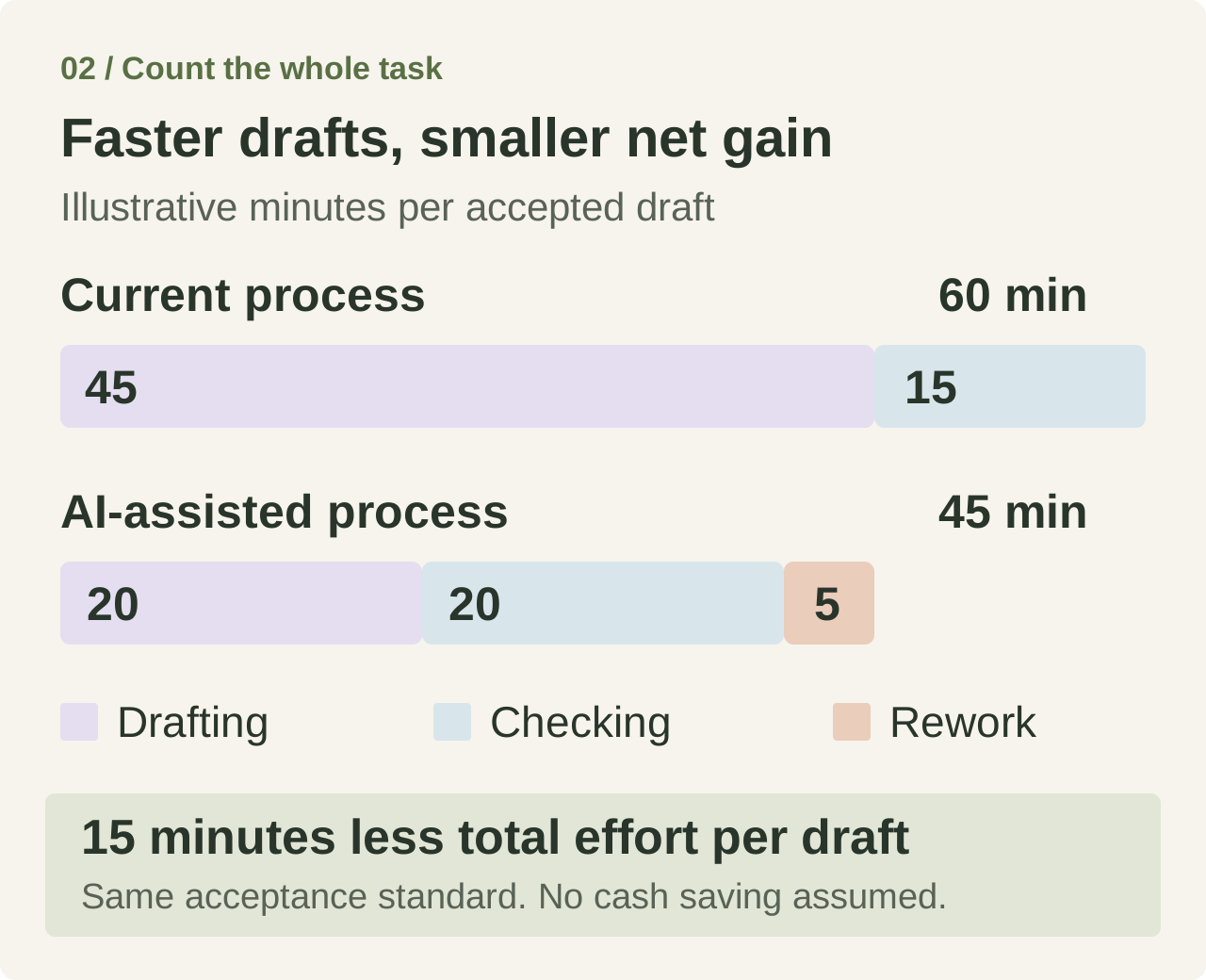
Timing the draft alone would miss the extra review effort. Timing only the person writing it could also miss work transferred to a manager, a specialist, or the next team. Track the whole path to an accepted result, and keep a separate measure of elapsed turnaround time when waiting is the real problem.
Vas, the CEO of AI implementation firm Varick, makes the distinction between effort and waiting in a September 2026 article on X.
The work can be minutes while the process can still be weeks.
From a consultant's account of an unnamed client case in an article about his firm's AI implementation work.
A quick draft can still sit in an approval queue for days. If waiting dominates, a faster draft may barely change delivery time. Measure both human effort and elapsed turnaround time.
Keep a small set of useful pilot measures
| Measure | What to record |
|---|---|
Total human effort | Preparation, drafting, checking, rework, and work passed to other people. |
Elapsed turnaround time | Time from starting the task to an accepted result, including waiting. |
Output quality | Whether the result meets the same acceptance standard as the current process. |
Errors and escalations | Failures that matter, how they were handled, and who had to help. |
Use on eligible tasks | Whether people use AI on the work the pilot is meant to improve. |
Compare similar work and include people with different experience levels. A group made entirely of enthusiasts tells you less about the support the next cohort will need.
McKinsey's March 2025 report found positive correlations between reported financial impact and adoption practices, including tracking defined performance indicators. Its underlying survey was conducted in July 2024. The association supports paying attention to measurement; it doesn't show that installing a dashboard causes a financial return. McKinsey's research and methodology.
Give every pilot an expansion decision
Before the pilot begins, agree on:
- A review point. Allow enough representative work to judge the result. A monthly planning task needs a different observation window from daily support work.
- A decision owner. Name who will decide what happens next.
- Expansion conditions. Set the required benefit and quality standard, manageable exceptions, and a support load the next team can sustain.
- An early pause rule. Decide which serious errors would make it unacceptable to continue until the planned review.
A pilot should end in a decision. Expansion, another bounded test, and stopping are all legitimate outcomes.
| Decision | When it fits | What happens next |
|---|---|---|
Expand | The work meets the quality and benefit requirements, and support is ready. | Define the next cohort and check what changes for its work. |
Repair and repeat | Evidence is incomplete or a specific problem has a plausible fix. | Name the change and run another bounded test with a review point. |
Stop or choose another approach | Value is insufficient or risk is unacceptable. | Record what the team learned and close the pilot or evaluate an alternative. |
A promising result is permission to test the next scope. It doesn't establish that every department will benefit. Before expanding, check what changes for the next cohort:
- Information access and language.
- Employee experience and task mix.
- Approval requirements and available support.
If the same problem keeps returning, assign an owner to fix it before adding more users. If the benefit remains too small, record what you learned and close the pilot. An experiment can be useful even when the proposed tool doesn't become part of the workflow.
If a promising demo never becomes regular work, identify the evidence or commitment keeping the pilot waiting. A missing test and an uncommitted support team need different decisions.
If an established rollout has already lost its users, reconstruct the abandoned workflow and test a specific correction before planning another launch. Repair, narrower scope, replacement and retirement address different problems.
Put the next decision on one page
Bring a workflow owner, someone who does the work, and the adoption lead together. Fill in this short record for one candidate:
If you can't complete a line, you've found a decision the program needs. Resolve it with the people closest to the work. That gives your AI adoption strategy a concrete place to begin. If the proposal changes what the company offers its customers, test the business direction and its evidence at board level.
Questions about enterprise AI adoption
What is an enterprise AI adoption strategy?
An enterprise AI adoption strategy is a plan for improving work with AI across an organization. It connects selected workflows to business goals, assigns decision owners, gives employees suitable tools and support, and defines the evidence needed to expand. Buying licenses and running training sessions are activities within that plan; their completion does not establish that the work has improved.
Start with one recurring workflow. Record the current problem, the proposed change, the required quality standard, the owner and the conditions for expanding or stopping. The one-page pilot decision record gives you a concrete starting point and makes unresolved decisions visible.
How are enterprises adopting AI?
Enterprises use different arrangements for selecting tools, supporting employees and changing workflows. One practical arrangement combines departmental ideas with central implementation support. In the published account of Julie Szudarek's interview, Self Financial's departmental champions identify opportunities and a central AI operations team helps implement them and train colleagues. That is one company's reported approach, rather than evidence that every organization needs the same structure.
For your own program, establish how a team's idea reaches someone who can change the workflow, check the result and support other users. The ownership and support arrangements separate those responsibilities so an idea does not end with a demonstration.
Who should lead an AI adoption program?
Choose an AI adoption lead who can investigate workflows, coordinate business and technical teams, help colleagues learn, and interpret results. Give them an executive sponsor who can resolve funding and cross-team decisions. Each workflow also needs a business owner with authority to change the work and act on the findings; the program lead cannot take responsibility for every department's results.
One person may hold several responsibilities in a smaller organization, provided they have the time and authority to carry them out. Use the responsibility table to check who can make each decision. When hiring a lead, ask for examples of workflow investigation, learning support and decisions based on results, as well as enthusiasm for AI.
How do you get employees to use AI more?
Start with a task employees want help with and check that an approved AI tool can handle it at an acceptable standard. Give people time to practise on real work, examples of how to check results, and someone to ask for help. The aim is useful work: frequent logins do not by themselves show that employees benefit.
When use drops, ask employees to walk through a recent attempt. Investigate access, task fit, review effort and available support before prescribing more training. Follow the practical learning sequence to make checking part of practice, and use the people and change guide when you need to identify which working conditions to address.
How do you measure the value of AI adoption?
Compare similar work before and during an AI pilot, using the same acceptance standard. Count all human effort, including preparation, checking, rework and work passed to others. Track errors and the business outcome alongside that effort. Measure elapsed turnaround time separately when waiting matters, because a faster draft may still sit in an approval queue.
Treat time released as capacity until you establish how it is used. For example, clearing a backlog and reducing spending are different outcomes and need different evidence. The complete-task effort example shows why checking can reduce an apparent saving. The AI value measurement guide explains how to connect usage, task results and business outcomes without treating them as interchangeable.
Should a company buy AI tools or build its own?
Test approved AI tools you already have against a defined workflow first. Configure or integrate a product when its core capability works but needs company context or a connection to the next step. Consider a custom build when a material requirement remains unmet and the company can fund ongoing evaluation, permissions, monitoring and support. A company may choose different options for different workflows.
Compare total effort and output quality on representative work, including maintenance and recovery when something fails. Keep a simpler process change or predictable automation in the comparison if it can solve the problem. Use the buy, configure or build comparison to identify both the fit and the operating responsibility before committing.