


Measure net time saved by AI by comparing the total human effort needed to produce comparable, accepted work with and without it. Count preparation, prompting, checking, corrections and work passed to colleagues. Keep waiting time and one-off setup effort visible, but separate from recurring active work.
The useful question is not how quickly a tool produces something. It is how much effort the organization needs to reach a result someone can use.
This guide is for a workflow owner or analyst building that estimate. The broader guide to measuring AI value explains how to connect it to operational outcomes and financial decisions.
Define the result that stops the clock
Suppose a procurement coordinator compares three supplier quotations for replacement warehouse scanners. A usable comparison must match quantities, warranty terms and delivery dates to the original quotations, flag missing information and reach the purchasing manager for a decision. A generated comparison that still needs those checks has not finished the job.
Agree the endpoint before recording time. Keep the same acceptance standard for both methods, and specify which people and stages the measurement includes. Otherwise, a saving for the coordinator may conceal extra work for the purchasing manager.
A Reddit user trying to automate project plans raised a similar question. Their manual plans needed repeated updates, and they proposed comparing manual creation time with the agent's time, alongside setup effort. Another Reddit user asked whether the plans would be of equivalent quality. The discussion contained no measured result, but the objection matters: an earlier draft and a usable plan are different endpoints.
For the scanner comparison, record these boundaries:
- Start. The coordinator receives the same required supplier information.
- Finish. The purchasing manager accepts the comparison as ready for a decision.
- Quality. The figures and terms are traceable, and missing information is identified.
- Scope. Include the coordinator's work and the manager's checking and clarification time.
Do not hide rejected attempts. If an AI attempt fails and the coordinator starts again manually, the failed attempt is part of the effort needed to finish that case.
Choose evidence that can support the claim
Different methods answer different questions. A short diary combined with a check of selected cases is often a practical starting point for ordinary business work. Use existing process records where they clarify what happened, and explain to participants what is being recorded and why.
| Method | Useful for | Main limitation |
|---|---|---|
Retrospective employee estimate | Finding tasks that feel faster or more burdensome | People must imagine the alternative and remember time spent |
Task diary completed near the work | Recording preparation, review and corrections across people | Missing entries, interruptions and inconsistent categories need checking |
Workflow or application logs | Locating events, queues, tool use and repeated activity | A timestamp or open session does not prove continuous human effort |
Direct observation or timed work samples | Understanding what people actually do within a defined task | Observation takes effort and may change behavior; the sample may be narrow |
Treat a survey answer such as “about two hours a week” as a reported estimate. It can identify a workflow worth studying without establishing an audited saving.
In METR's early-2025 experiment, 16 experienced open-source developers completed 246 real issues with AI use randomly allowed or disallowed. AI-allowed work took 19% longer, while developers afterward believed AI had made them about 20% faster. That finding is specific to those developers, repositories and early-2025 tools. It illustrates why perceived speed and recorded time need separate labels.
The reverse caution applies to logs. In Dillon and colleagues' study of work patterns, application sessions were constructed from sequences of activity with gaps of up to 15 minutes. The researchers noted that sessions in different applications could overlap. Such records can reveal changes in application use without providing a complete account of labor time or output quality.
Even a sophisticated model estimate has a boundary. Anthropic's analysis of Claude conversations explicitly notes that work outside the conversation is missing from its time-saving estimates. Your receiving team's checks may happen entirely outside the AI tool.
Record the whole case once
Give each case a shared identifier so the coordinator and manager can record their work against the same result. A small spreadsheet can be enough. Avoid collecting the contents of supplier quotations when a case ID, task category and timing record will answer the question.
- Describe the case. Record the task type, complexity, method used, relevant tool version and whether required information was available.
- Record active effort by stage and person. Include preparation and prompting, source checks, corrections, review and any manual restart. Record near the work, with interruptions excluded consistently.
- Record the outcome. Note acceptance, return for correction, abandonment and any later defect within an agreed follow-up window.
- Keep elapsed time alongside effort. Record when the case started and finished, and where it waited. Do not add a queue's duration to someone's active minutes.
- Check the record with the people involved. Resolve missing entries and overlap before calculating a saving. Mark uncertain estimates as uncertain.
For a cohort of cases, divide all included human effort by the number of accepted results. Include effort on failed attempts and abandoned cases in the numerator, and report the attempted and accepted counts alongside the ratio. If nothing is accepted, report that outcome rather than a time-per-result figure.
Compare similar task mixes and quality outcomes. A group of straightforward AI-assisted cases should not be compared with a manual queue full of exceptions. Use the AI adoption metric definitions to keep the population, period and denominator explicit.
Calculate the difference after review and rework
For the scanner comparison, suppose the two methods produce an accepted result with the effort below.
| Human effort per accepted comparison | Current method | AI-assisted method |
|---|---|---|
Coordinator preparation and drafting, including prompting when used | 35 minutes | 8 minutes |
Coordinator source checking | 10 minutes | 12 minutes |
Coordinator corrections | 5 minutes | 7 minutes |
Purchasing manager review and clarification | 10 minutes | 15 minutes |
Total | 60 minutes | 42 minutes |
The drafting stage appears to save 27 minutes. Across both people, the net recurring saving is 18 minutes, or 30% of the 60-minute baseline. The increased checking and correction effort is already inside the 42-minute total, so do not subtract it again.
To estimate the saving in your team, use an appropriate comparison and enough observations to understand variation. A before-and-after record may also reflect different suppliers, easier cases or growing familiarity with the process.
Separate agent waiting from human effort
An agent can work while a person does something else. Recording the whole interval as active human work exaggerates effort; ignoring time spent watching and intervening understates it.
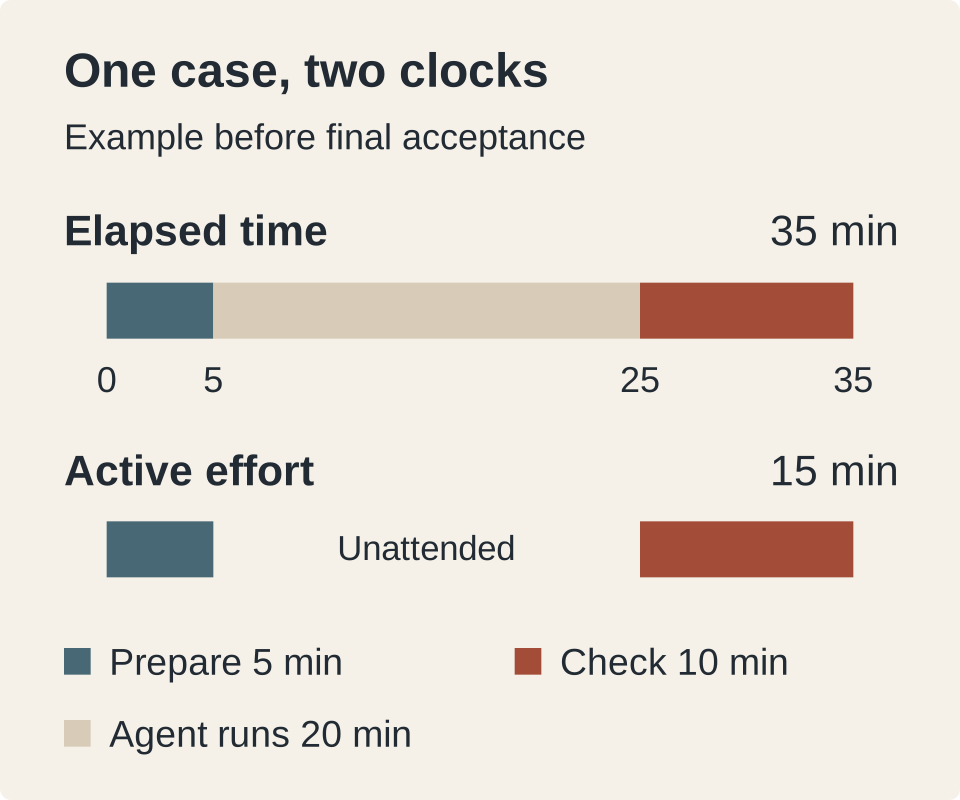
Suppose the coordinator spends five minutes preparing a request, then the agent runs for 20 minutes while the coordinator handles an unrelated task. The coordinator returns for ten minutes of checking. The case has taken 35 elapsed minutes and 15 active coordinator minutes at this point. It still needs any remaining correction and manager review before acceptance.
This is a measurement problem researchers encounter too. In its February 2026 follow-up, METR reported difficulty measuring time when developers worked on other tasks while agents ran. Participant and task selection also made its newer productivity estimate unreliable. Neither its earlier slowdown nor its later raw estimates should be treated as a universal result for today's tools.
If two agents run concurrently for 20 minutes, that is not 40 minutes of human effort. Record the person's actual preparation, attention and review without assigning the same minute twice. If someone must stay available and cannot use the waiting interval, record that constraint separately; it affects whether the time is usable even if little active work occurs.
Keep setup costs and uncertainty visible
Recurring savings and rollout effort belong in the same decision, with different labels.
Suppose the scanner workflow requires ten additional person-hours to configure, test and teach. If 100 comparable accepted cases each save 18 recurring minutes, they release 30 person-hours before setup. Subtracting the ten setup hours leaves 20 person-hours over that first batch, assuming no other incremental effort. Include ongoing support or maintenance if it occurs, and do not deduct setup again in every later batch.
For a real estimate, report more than the average:
- The number of attempted and accepted cases, people and observation dates.
- Task categories, quality checks and any change in acceptance or defect rates.
- Typical effort and its spread, including cases where AI took longer.
- Missing records, estimated timings and alternative explanations.
- One-off effort, recurring support and the window used to allocate them.
Do not scale a saving observed among regular users to every license holder. State whether the estimate concerns attempted AI-assisted cases, active users or everyone offered access. Those populations answer different questions.
Nor should the estimate automatically become a salary saving. A released hour may reduce overtime, make room for other work or remain fragmented. Follow that next step through the guide to why personal productivity may not appear in company results.
Questions about measuring AI time savings
What is the formula for net time saved by AI?
For comparable work at the same quality standard, subtract AI-assisted human effort per accepted result from baseline human effort per accepted result. Include every involved person's preparation, prompting, checking, correction and failed attempts. Report one-off setup and ongoing support explicitly. The scanner comparison example shows how a large drafting saving becomes a smaller net saving.
Can an employee survey measure AI time savings?
An employee survey can measure reported savings and identify useful tasks or hidden burdens. On its own, it does not establish how much time the same work would have taken without AI. Ask about specific recent cases and compare answers with task diaries, selected observations or suitable process records. Keep the result labeled as self-reported unless stronger evidence supports a different claim.
Should prompting and checking count against time saved?
Yes. Prompting, checking, corrections and review by colleagues are part of the assisted workflow's human effort. Include comparable activities in the baseline too. If the recorded assisted total already includes those activities, do not subtract them a second time. Keep unattended agent time separate from active human effort.
How long should a time-saving study run?
Run it long enough to observe the relevant work cycle, ordinary variation and later corrections. There is no universal number of days or tasks that makes an estimate credible. Separate early learning from established use, include difficult and failed cases, and seek evaluation support when a decision requires a causal or statistically precise result. Start by testing whether your case record captures all the work before expanding collection.